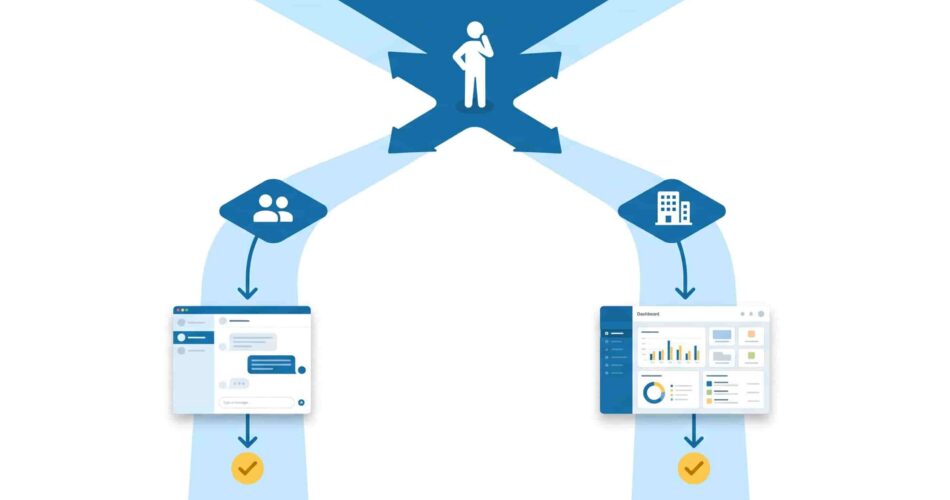
If your team lives in Microsoft Teams all day, making them open a separate portal to file a $45 lunch expense is a friction tax you pay every single month. Late submissions, chased receipts, and month-end reconciliation chaos are almost always symptoms of one thing: the expense tool lives somewhere else. The good news is that Microsoft Teams expense tracking has matured significantly — there are now tools built specifically to keep the entire workflow inside Teams, and tools that integrate deeply enough to make the context-switching minimal. Here are the 7 best options in 2025, starting with the one built most natively for teams that want zero dashboard.
What is Microsoft Teams expense tracking?
Microsoft Teams expense tracking refers to managing business expenses — submission, approval, reimbursement, and accounting sync — directly inside Microsoft Teams, without switching to a separate platform. The best Teams expense tracking apps let employees submit receipts, get approvals, and receive reimbursement confirmations entirely within Teams conversations or tabs. The depth of Teams integration varies significantly by tool, from fully native conversational apps to tab-based portals to notification-only add-ons.
Why Microsoft Teams expense tracking matters
Microsoft Teams has approximately 320 million daily active users as of 2025, and is used by more than one million organizations globally. For most of those organizations, Teams isn’t just a chat tool — it’s the operating environment. Meetings happen there. Approvals happen there. Projects get tracked there.
Yet the vast majority of expense tools still route employees to a separate dashboard the moment they need to file a claim. That creates friction, and friction creates delays. Microsoft Teams expense management that centralizes submission and approvals within Teams means employees submit expenses faster while finance teams gain clear visibility and control — reducing back-and-forth and keeping expense management simple and efficient.
The difference between a tool that sends Teams notifications and a tool that lives inside Teams is significant. Here’s how the seven best options compare.

1. ExpenseTron — Best for small teams that want zero dashboard
What it is: A fully Teams-native and Slack-native expense management tool built for growing companies. ExpenseTron handles receipt submission, approvals, mileage tracking, multi-currency expenses, and accounting sync — entirely inside Teams. No separate portal, no new login, no training required.
How Teams integration works: ExpenseTron is a conversational app — employees interact with it directly in Teams chat, not through a separate tab or portal. Submit a receipt by messaging the bot. Get an approval notification as a Teams message. Approve with one click without leaving Teams. The entire expense approval workflow happens as a natural Teams conversation.
What makes it genuinely different: Most expense tools on this list require employees to log into a web dashboard to complete certain actions. ExpenseTron doesn’t. Everything — submission, approval, reporting, reimbursement confirmation — happens inside Teams. It’s also fully card-agnostic, which means employees can submit out-of-pocket expenses and reimbursements without needing a corporate card. That matters for small teams where not everyone holds company plastic.
Accounting sync: Native integration with QuickBooks Online and Xero. Approved expenses sync automatically — no manual re-entry.
Best for: Teams of 10–100 people running on Microsoft Teams or Slack who want expense tracking to feel like part of their existing workflow, not a separate tool they have to remember to log into.
Pricing: Free trial available. See ExpenseTron plans →
If you want to see exactly how the approval workflow runs inside Teams, our post on how to approve expenses in Slack walks through the same flow — the Teams experience is identical.
2. Expense 365 — Best for Microsoft 365-native organizations
What it is: An expense management solution built specifically inside the Microsoft 365 ecosystem — SharePoint, Teams, Azure, and Dynamics 365. Expense 365 integrates effortlessly with Microsoft tools such as Teams, Azure, and Dynamics 365, improving workflows and enhancing team efficiency, and can be set up and running in less than 10 minutes.
How Teams integration works: Expense 365 runs as a personal tab or Teams tab inside Microsoft Teams, meaning employees access it directly from their Teams sidebar without leaving the app. It uses Azure OpenAI for receipt scanning, automatically scanning, reading, and sorting receipts with high accuracy, helping employees submit expenses faster and with fewer errors.
What makes it genuinely different: If your organization is already deep in the Microsoft stack — SharePoint, Dynamics, Power BI — Expense 365 will feel like it belongs there, because it does. Data stays inside your Microsoft 365 tenant, which matters for security-conscious organizations. It also connects with QuickBooks, Xero, and Zoho Books.
Best for: Organizations already running on Microsoft 365 that want expense management to live inside their existing environment without adding an external tool. Particularly strong for companies with compliance requirements or government/public sector clients.
Pricing: Free for up to 1 user. Paid plans available via the Microsoft Marketplace. See Expense 365 →
3. Expensya — Best for multi-currency and international teams
What it is: A web and mobile-first expense management platform with a proper Microsoft Teams integration. Expensya sends timely notifications to managers when expenses need to be approved, and every expense created on the web or mobile app is instantly reflected in the Teams app, providing a unified view of expenses and effortless tracking across devices.
How Teams integration works: Expensya runs as a tab inside Teams with three dedicated views — a Conversations tab for notifications and approvals, a My Expenses tab for employees to submit and track claims, and a Manager tab for approving and filtering team reports. It’s a genuine Teams app, not just a webhook notification.
Worth noting: The Microsoft Teams integration is sold as a paid add-on rather than included in base plans, so factor that into the total cost when comparing options.
What makes it genuinely different: Expensya’s OCR receipt scanning is fast and handles multiple languages and currencies well, making it a strong fit for international or multilingual teams. It also integrates with Oracle, Microsoft Dynamics, and Uber — useful for larger or more complex operations.
Best for: Mid-sized companies with international employees or multi-currency expense needs that want a polished web and mobile experience with meaningful Teams touchpoints.
Pricing: Subscription-based; Teams integration available as an add-on. See Expensya →
4. SAP Concur — Best for enterprise organizations
What it is: The enterprise standard for travel and expense management, used by large organizations globally. SAP Concur launched its integration with Microsoft Teams in January 2025, bringing Concur Travel and Concur Expense directly into Teams so employees can coordinate travel details and gain expense approvals entirely within the Teams environment.
How Teams integration works: Employees can view their most recent active expense reports within Microsoft Teams, share expense reports with colleagues or approvers directly in Teams, and approvers can review details, add comments, and approve or send back reports directly within Teams — with all actions tracked in the audit log in SAP Concur.
What makes it genuinely different: If your organization processes thousands of expense reports per month, has complex travel management needs, or operates across multiple countries with strict compliance requirements, SAP Concur is in a different league from the other tools on this list. The Teams integration makes the day-to-day workflow more accessible without sacrificing the depth of the platform.
Best for: Mid-market to enterprise companies with complex T&E management, multi-country compliance requirements, and existing SAP infrastructure.
Pricing: Custom enterprise pricing. Contact SAP Concur for a quote. See SAP Concur →
5. Budget Tracker for Microsoft Teams — Best free option for project budget tracking
What it is: A lightweight budget and expense tracking app built specifically for Microsoft Teams, designed for project-level spend tracking rather than full employee reimbursement workflows. Budget Tracker lets you create personal or shared budget trackers, use them in channels or chats, add project spending and attach it to one or multiple budgets, set expense statuses for future expenses, and attach receipts, documents, or links directly to expenses.
How Teams integration works: Fully native — Budget Tracker runs entirely inside Teams as a tab in channels or chats. No external login required. It’s designed to be added directly to a Teams channel and used collaboratively by the whole team.
What makes it genuinely different: This is the lightest-weight option on the list and the most genuinely Teams-native after ExpenseTron. It doesn’t try to be a full expense management platform — it’s a simple, clean budget and spend tracker that lives entirely in Teams. It can be used free of charge up to a limited number of expenses, with a Pro license required for unlimited expenses and advanced features.
Best for: Small teams or project leads who need a lightweight way to track project budgets and expenses directly in a Teams channel without a full expense management system.
Pricing: Free up to a limited number of expenses. Pro license available for unlimited use. See Budget Tracker →
6. Axtract Expense Management — Best for Power Platform users
What it is: An expense management system built on Microsoft Power Apps, Power Automate, and Dataverse — designed specifically for organizations already using the Microsoft Power Platform. Axtract enables employees to submit expenses effortlessly from mobile devices or desktops, while managers and finance teams gain real-time visibility into project expenditures with automated approval workflows.
How Teams integration works: Axtract runs inside Teams as a personal tab and connects to Power Automate for automated approval routing, notifications, and reminders. Because it’s built on the Power Platform, organizations can customize workflows without code.
What makes it genuinely different: If your team already uses Power Apps or Power Automate for other workflows, Axtract slots in natively without adding a new vendor to your stack. Finance teams get real-time budget dashboards and audit-ready records. Admins can configure expense categories, approval chains, and budget limits without IT support.
Best for: Organizations running Microsoft Power Platform who want expense management to extend their existing automation workflows rather than add a standalone tool.
Pricing: Available via the Microsoft Marketplace. See Axtract →
7. Microsoft Teams Approvals + Power Automate — Best DIY option
What it is: Not a third-party tool, but Microsoft’s own native solution — combining the built-in Teams Approvals app with Power Automate to create a custom expense approval workflow inside Teams.
How Teams integration works: Microsoft Teams Approvals lets users submit, route, and track approval requests directly inside Teams, replacing scattered email threads and follow-up messages with a single transparent workflow. Approval status is visible in real time, and every approval is logged, keeping processes accountable and auditable. Connected to Power Automate, you can build routing rules, reminders, and accounting notifications.
What makes it genuinely different: It’s free if you already have a Microsoft 365 subscription. There’s no new vendor, no new contract, and no new software to learn. For simple single-tier expense approvals with a small team, it can get the job done with a few hours of setup.
The honest trade-off: This is a build-it-yourself solution. You get the flexibility of customization but none of the purpose-built features — no receipt scanning, no multi-currency conversion, no accounting sync, no mileage tracking. As your team grows or your expense complexity increases, you’ll likely outgrow it and need a dedicated tool.
Best for: Very small teams that need a basic approval workflow and already have Microsoft 365, don’t want to pay for a third-party tool, and have someone willing to set it up in Power Automate.
Pricing: Included with Microsoft 365 subscription. Power Automate may require an additional license for advanced workflows.
Quick comparison: Microsoft Teams expense tracking apps
| Tool | Teams depth | Best for | Accounting sync | Card required |
|---|---|---|---|---|
| ExpenseTron | Fully native — conversational bot | Small teams, zero-dashboard workflow | QuickBooks, Xero | No — card agnostic |
| Expense 365 | Native — Teams tab, M365 ecosystem | M365-native organizations | QuickBooks, Xero, Zoho | No |
| Expensya | Deep — tabs, approvals, notifications | International / multi-currency teams | Dynamics, Oracle, QuickBooks | No |
| SAP Concur | Deep — approvals, travel, notifications | Enterprise / complex T&E | SAP, NetSuite, Dynamics | Optional |
| Budget Tracker | Fully native — Teams tab | Project budget tracking | None | No |
| Axtract | Native — Power Platform, Teams tab | Power Platform users | Via Power Automate | No |
| Teams Approvals + Power Automate | Native — built into Teams | DIY / basic approval only | Manual / custom build | No |
How to choose the right Microsoft Teams expense tracking app
The right tool depends almost entirely on your team size and complexity.
If you’re a small or growing team — say 10 to 100 people — and your priority is getting expense tracking out of email threads and into a single, frictionless workflow, ExpenseTron is the strongest choice. It’s the only tool on this list that keeps the entire process inside Teams as a conversation, with no tab to open, no portal to log into, and no card requirement. For a team that runs on Teams, that’s a meaningful difference in day-to-day adoption.
If you’re already deep in the Microsoft 365 ecosystem and want expense tracking to live alongside SharePoint, Power BI, and Dynamics, Expense 365 or Axtract will feel most at home. If you need enterprise-grade travel and expense management with compliance controls, SAP Concur is in a category of its own. And if you just need project-level budget tracking without a reimbursement workflow, Budget Tracker is the simplest and cheapest path.
For more on building an expense process that works across remote and international teams, see our post on how remote teams handle business expenses across different countries. And if you’re still figuring out what your expense policy should look like before picking a tool, our travel expense policy template is a good starting point.

Frequently Asked Questions
What is the best Microsoft Teams expense tracking app?
For small and growing teams, ExpenseTron is the strongest option because it runs as a fully native Teams bot — employees submit expenses, get approvals, and receive reimbursement confirmations entirely inside Teams without opening a separate tool. For enterprise organizations with complex travel needs, SAP Concur offers the deepest functionality with a solid Teams integration launched in 2025.
Can you track expenses directly inside Microsoft Teams?
Yes. Several tools offer genuine Microsoft Teams expense tracking, ranging from fully native conversational bots like ExpenseTron to tab-based apps like Expense 365 and Expensya. Microsoft’s own Teams Approvals feature combined with Power Automate also provides a basic DIY expense approval workflow at no additional cost beyond your Microsoft 365 subscription.
What’s the difference between a Teams-native expense app and a Teams integration?
A Teams-native app is built to run entirely inside Teams — employees never need to leave the platform. A Teams integration connects an external tool to Teams, usually to send notifications or allow limited actions. Most expense tools on this list fall somewhere between the two. ExpenseTron and Budget Tracker are the most genuinely native; SAP Concur, Expensya, and others offer deep integrations but maintain a separate platform as the primary interface.
Does Microsoft Teams have a built-in expense tracking feature?
Not natively. Microsoft Teams includes an Approvals feature that can handle basic expense approval requests, and when connected to Power Automate, it can route and track approvals automatically. However, it doesn’t include receipt scanning, multi-currency support, mileage tracking, or accounting sync out of the box. For those features, a dedicated expense management app is needed.
Do I need a corporate card to use Teams expense tracking apps?
No — most of the tools on this list work without a corporate card. ExpenseTron is fully card-agnostic, meaning employees can submit out-of-pocket reimbursements, mileage claims, and receipt-based expenses without needing a company card. This makes it particularly suitable for small teams or international employees who pay personally and get reimbursed.
How does expense approval work inside Microsoft Teams?
With a tool like ExpenseTron, an employee submits an expense by messaging the bot in Teams. The bot automatically routes it to the right approver based on the employee’s team or the expense amount. The approver receives a Teams notification with the expense details and approves or rejects in one click — without leaving Teams. The approved expense then syncs to QuickBooks or Xero automatically.
Is SAP Concur available in Microsoft Teams?
Yes. SAP Concur launched its Microsoft Teams integration in January 2025, available via the Microsoft App Store. It allows employees to view and share expense reports inside Teams and lets approvers review and approve expense reports directly within the Teams interface, with all actions logged in SAP Concur for audit purposes.
What expense management features should I look for in a Teams app?
The most important features for Microsoft Teams expense tracking are: native or deep Teams integration (so employees don’t need to leave the platform), receipt capture and scanning, automatic routing to the right approver, accounting sync with QuickBooks or Xero, multi-currency support for international teams, mileage tracking, and an audit trail. For small teams, ease of adoption matters more than feature depth — the best tool is the one your team will actually use every day.
The right Microsoft Teams expense tracking tool depends on what your team actually needs — not the most features, but the right features in the right place. For most small and growing Teams-first companies, that means a tool that lives where the work happens, requires no new logins, and gets expenses approved before anyone has to ask twice.
Try ExpenseTron free inside Microsoft Teams →